Getting Started
NERSC access
To get started with using agora_analysis, you will need to have a few prerequisites. Currently, this code is designed for use by the AGORA collaboration, and is more or less hard-coded to use the snapshots in our AGORA allocation folder on NERSC. This is all with the intention of radically simplifying the job for the end user, who rarely knows the details of how each code is stored, defined, or in most cases loaded. Most AGORA collaborators are experienced with only one or at most two or three codes. To gain access to our account on NERSC, sign up at the NERSC homepage. with the PI Tom Abel (please send us an email before doing this). When you have access, it is extremely straightforward to load the CosmoRun simulation, and support for the other AGORA simulations is in the works.
NERSC is not intended to be the permanent home of the AGORA snapshots, and eventually they should migrate to FlatHUB. When that migration is complete, we will update the code accordingly so scripts using that computer will work as well. Ideally, the code will detect what computer you are using or build a personalized path for the downloaded codes. It is highly unlikely any end user will ever be able to download appreciable amounts of AGORA data to a personal computer.
AgoraSnapshot
Once you have access to the snapshots, the first thing you will want to do is load an AgoraSnapshot. These are the basic building blocks of all analysis in the agora_analysis package. An AgoraSnapshot contains all the associated metadata for the relevant simulation, including its name, file location, code type, and the location of the zoom-in galaxy center. To create one, all you need is the simulation name and an approximate redshift.
import agora_analysis
snap = agora_analysis.AgoraSnapshot('AGORA_ramses_CR',3.0)
print(f"Rvir: {snap.Rvir}")
print(f"center: {snap.center}")
print(f"snap_path: {snap.lookup_snap_path()}")

>>>Rvir: 51.09333230183431 kpc
>>>center: [10506.89180578 11192.04897073 10796.9198899 ] kpc
>>>snap_path: /project/projectdirs/agora/paper_CGM/ThinTimeSteps/RAMSES/Cal4/output_00182/info_00182.txt
The format for the names is AGORA_<code>_<simulation>, where the options for simulation are intended to be all the different runs of AGORA, including the isolated disk, DMO simulations, Cal1-4, and any future simulations that get created. Current functionality is limited to CosmoRun, which is denoted with CR. It looks up the snapshot with redshift closest to your desired redshift, and the virial radius can be loaded either using Rvir_method = 'average' to use the average of all codes at this redshift, or Rvir_method = 'specific' to use the Rvir of only that galaxy.
By default, agora_analysis does not load the simulation, allowing basic filtering and checking (and averaging Rvirs) very fast. However, if you want to load the simulation, simply run
snap = agora_analysis.AgoraSnapshot('AGORA_ramses_CR',3.0)
snap.load_snapshot()
snap.ds

Loading snapshot AGORA_ramses_CR, redshift 2.998 stored at /project/projectdirs/agora/paper_CGM/ThinTimeSteps/RAMSES/Cal4/output_00182/info_00182.txt
yt : [INFO     ] 2023-03-30 10:23:40,466 Parameters: current_time              = 2.537865356123531
yt : [INFO     ] 2023-03-30 10:23:40,470 Parameters: domain_left_edge          = [0. 0. 0.]
yt : [INFO     ] 2023-03-30 10:23:40,471 Parameters: domain_right_edge         = [1. 1. 1.]
yt : [INFO     ] 2023-03-30 10:23:40,472 Parameters: cosmological_simulation   = 1
yt : [INFO     ] 2023-03-30 10:23:40,472 Parameters: current_redshift          = 2.99847973132083
yt : [INFO     ] 2023-03-30 10:23:40,472 Parameters: omega_lambda              = 0.727999985218048
yt : [INFO     ] 2023-03-30 10:23:40,473 Parameters: omega_matter              = 0.272000014781952
yt : [INFO     ] 2023-03-30 10:23:40,473 Parameters: omega_radiation           = 0.0
yt : [INFO     ] 2023-03-30 10:23:40,474 Parameters: hubble_constant           = 0.701999969482422
>>> RAMSESDataset: /project/projectdirs/agora/paper_CGM/ThinTimeSteps/RAMSES/Cal4/output_00182/info_00182.txt
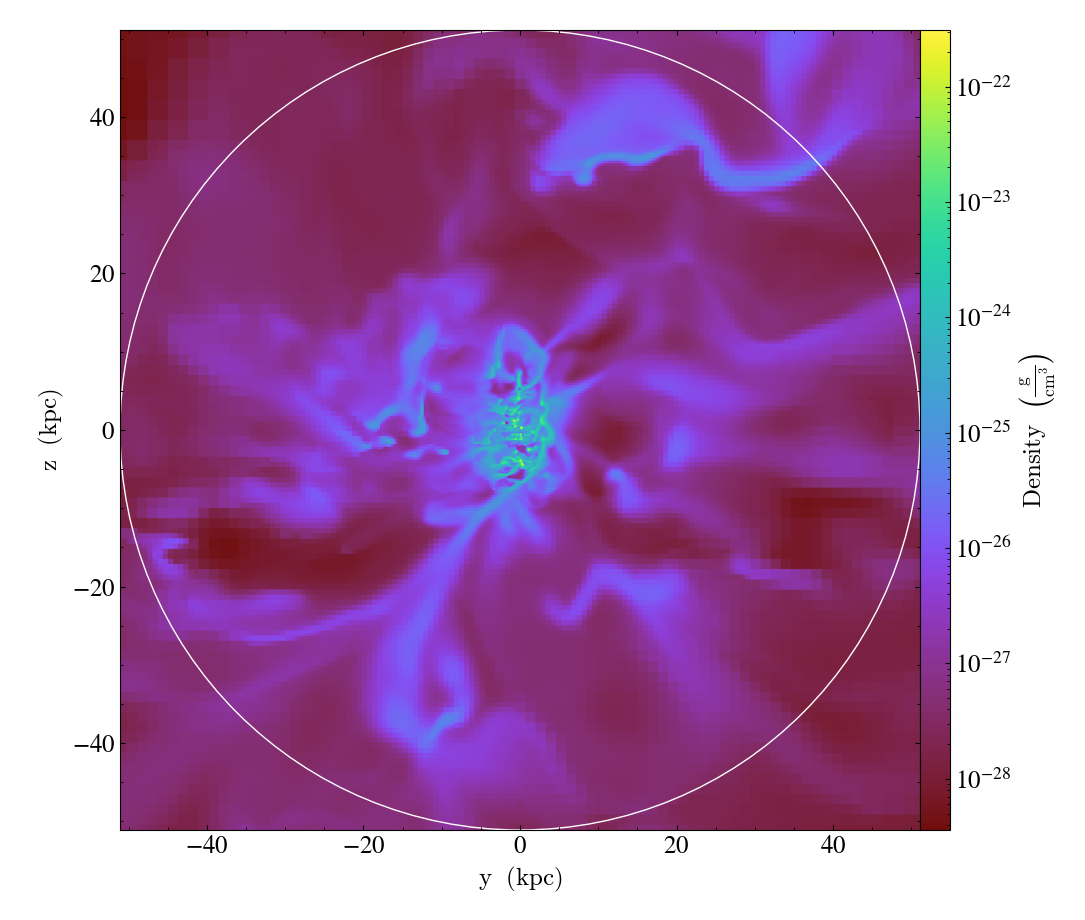
This lends itself very easily to any normal yt analysis, and for many users this is the extent of their need for agora_analysis, if they would be satisfied looking at one code at a time, or don’t necessarily need to compare all the codes on an equal basis. A basic use case would be to create a SlicePlot using yt
import yt
p = yt.ProjectionPlot(snap.ds,0,('gas','density'),width = 2*snap.Rvir, center = snap.center)
p.annotate_sphere(snap.center,snap.Rvir,circle_args = {'color':'white'})
which gives the following:
The rest of the package is specifically designed for the AGORA papers’ development. This includes loading new fields which are identical (and identically named) among the codes, as well as resources for creating comparison plots and comparative data collection.